
DNS records tell the internet where to find your website, where to deliver your email, and prove you own your domain to services like Google and Microsoft. If your domain uses AISweb nameservers, you manage these in cPanel's Zone Editor.
Opening the Zone Editor
- Log in to cPanel (see How to Log In to cPanel)
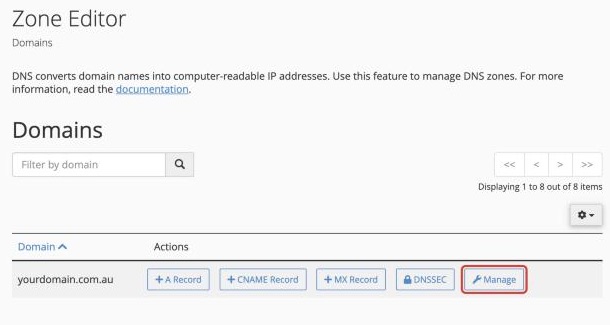
- In the Domains section, click Zone Editor
- Click Manage next to your domain
Common Record Types
- A: points a name to a server's IP address. Your website uses this
- CNAME: points a name to another name, for example www to your main domain
- MX: says which server receives email for your domain
- TXT: text used for verification, SPF, DKIM and DMARC
Adding a Record
- Click + Add Record and choose the type, for example Add TXT Record
- Fill in the fields:
- Name: the full name, ending with a dot, such as
www.yourdomain.com.au.oryourdomain.com.au.for the domain itself - TTL: leave the default
- Record: the value you've been given
- Name: the full name, ending with a dot, such as
- Click Save Record
Editing or Deleting a Record
Find the record in the list and click Edit or Delete. Use the filter buttons at the top (A, CNAME, MX, TXT) to find records quickly.
Examples
Verify Your Domain With Google or Microsoft
Add a TXT record with the name yourdomain.com.au. and the value they give you, which usually starts with google-site-verification= or MS=.
Point a Subdomain at Another Service
To point shop.yourdomain.com.au at a service like Shopify, add a CNAME record with the name shop.yourdomain.com.au. and the value the service gives you.
How Long Do Changes Take?
Most changes work within a few minutes to an hour. Some internet providers may keep the old value for up to the TTL time, usually 4 hours at most.
Be Careful
Deleting or changing the wrong record can stop your website or email working. If you're not sure, open a support ticket with the records you need and we'll add them for you.
