
cPanel is the control panel for your hosting. It's where you manage your website files, email accounts, databases and more.
Method 1: Through the Client Area (Recommended)
This is the easiest way, because you don't need a separate cPanel password.
- Log in to the Client Area at https://secure.aisweb.com.au (see How to Log In to the Client Area)
- Click Services in the top menu, then My Services
- Click the hosting service you want to manage
- Click Log in to cPanel
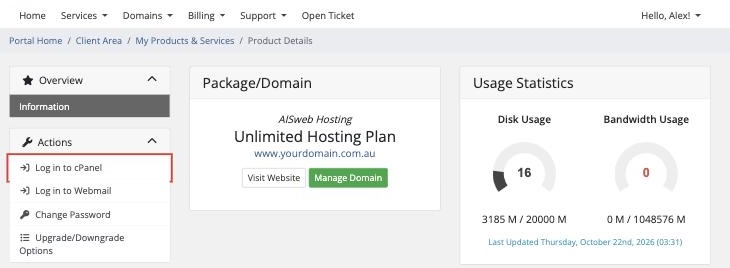
cPanel opens in a new tab and you're logged in automatically.
Method 2: Log In to cPanel Directly
- Go to
https://yourdomain.com.au:2083orhttps://cpanel.yourdomain.com.au(replace yourdomain.com.au with your own domain) - Enter the cPanel username and password from your hosting welcome email
- Click Log in
If your domain isn't pointing to AISweb yet, the direct address won't work. Use Method 1 instead.
Forgotten Your cPanel Password?
- Easiest: use Method 1, which doesn't need your cPanel password
- Reset it: in the Client Area go to Services > My Services, click your hosting service, then click Change Password
- Ask us: contact our support team
What You Can Do in cPanel
- Email: create and manage email accounts on your domain
- Files: upload and manage your website files with File Manager or FTP
- Databases: create and manage MySQL databases
- WordPress: install WordPress in a few clicks with Softaculous
- Security: free SSL certificates, malware scanning with Imunify360, and two-factor authentication
- Backups: restore files, databases and email yourself with JetBackup
- Statistics: see your website's visitors and errors
Bookmark the Client Area login page. It's the quickest way into cPanel, email and billing.
