
New to cPanel? Here's where to find the things you'll use most.
Getting In
The easiest way is through the Client Area. See How to Log In to cPanel.
Finding Your Way Around
- Search box: at the top of the page. Type what you're after, like "email" or "backup", and click the result. This is the quickest way to find anything
- Sections: tools are grouped into sections such as Email, Files, Databases, Domains, Metrics, Security and Software
- General Information: the panel on the right shows your username, server name, and how much disk space and bandwidth you've used
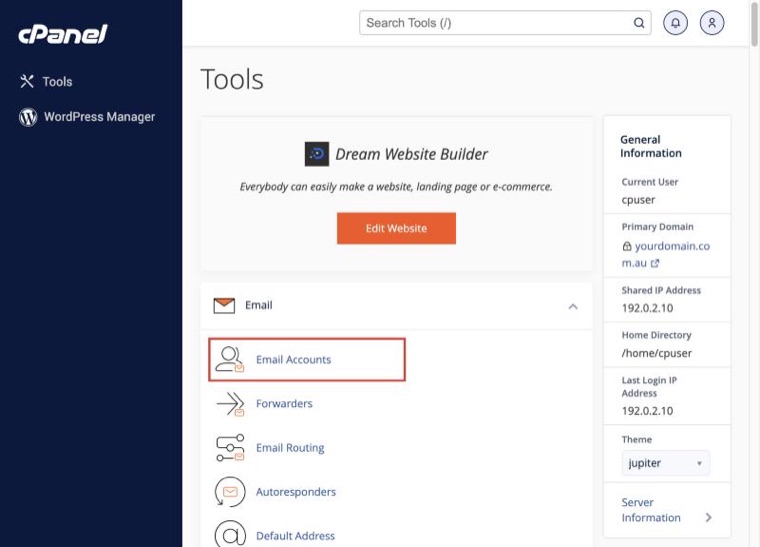
The Tools Most People Use
- Email Accounts: create mailboxes. See How to Create an Email Account
- Forwarders: pass email on to another address. See How to Set Up Email Forwarding
- Spam Filters: see How to Adjust Your Spam Filter Settings
Files
- File Manager: upload and edit website files. See How to Use cPanel File Manager
- FTP Accounts: see How to Create an FTP Account
- Disk Usage: see what's using your space. See How to Check Your Disk Space Usage
Websites
- Softaculous Apps Installer: install WordPress and other apps. See How to Install WordPress
- Domains: add domains and subdomains, and force HTTPS
- MultiPHP Manager: change your PHP version. See How to Change Your PHP Version
Keeping Safe
- JetBackup: restore earlier copies of files, databases and email. See How Backups Work at AISweb
- Imunify360: malware scanning. See How to Scan for Malware
- SSL/TLS Status: check your free SSL certificates. See Free SSL Certificates and HTTPS
Not sure where something is? Use the search box at the top of cPanel, or search this knowledgebase.
