
Every AISweb hosting plan includes free SSL certificates. SSL encrypts the connection to your website, shows the padlock in the browser, and helps your Google ranking.
How It Works
AutoSSL automatically adds a free certificate to every domain and subdomain in your cPanel account, and renews it before it expires. There's nothing to buy or install.
New domains usually get their certificate within a few hours, once the domain is pointing to AISweb.
Checking Your Certificates
- Log in to cPanel (see How to Log In to cPanel)
- In the Security section, click SSL/TLS Status
- Each domain shows a green padlock when it has a valid certificate
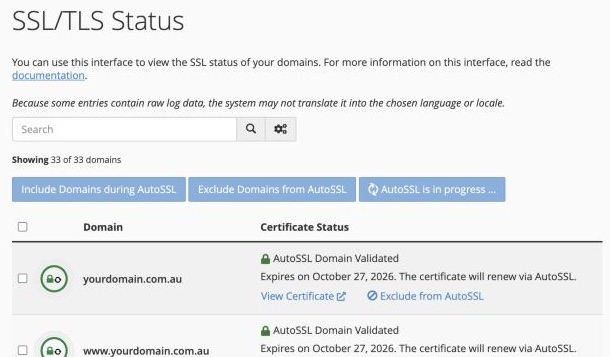
If a domain shows a problem, click Run AutoSSL to try again. Hover over the warning to see why it failed. The most common reason is that the domain isn't pointing to AISweb yet.
Sending Every Visitor to HTTPS
- In cPanel, go to Domains in the Domains section
- Turn on Force HTTPS Redirect next to your domain
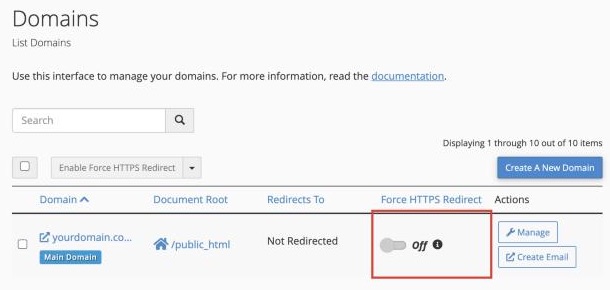
Now anyone who visits http://yourdomain.com.au is sent to https:// automatically.
Using WordPress?
Make sure WordPress knows to use https:
- In WordPress, go to Settings > General
- Change both WordPress Address and Site Address to start with https://
- Click Save Changes
"Not Secure" Still Showing?
If the padlock is missing even though your certificate is valid, the page is probably loading an image or file over http://. This is called mixed content. In WordPress, a plugin like Really Simple SSL can fix it, or contact our support team and we'll help.
