
PHP is the programming language WordPress and many other websites run on. You can choose which version each website uses, and change settings like the upload size limit.
Changing the PHP Version
- Log in to cPanel (see How to Log In to cPanel)
- In the Software section, click MultiPHP Manager
- Tick the box next to the domain you want to change
- Choose a version from the PHP Version list at the top right
- Click Apply
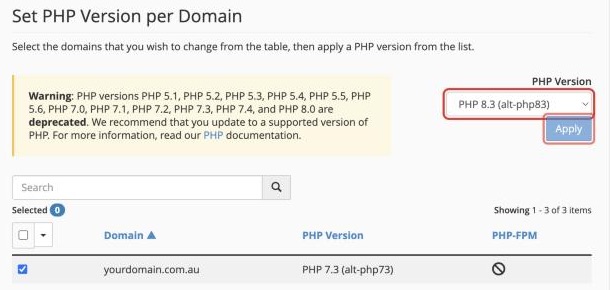
Use the newest version your website supports. Old versions no longer get security fixes. If something breaks after changing, switch back and ask your developer to update the site.
Changing PHP Settings
- In the Software section, click MultiPHP INI Editor
- On the Basic Mode tab, choose your domain
- Change the settings you need, for example:
- upload_max_filesize: the largest file you can upload, such as 64M
- post_max_size: set this a bit higher than upload_max_filesize
- memory_limit: how much memory a script can use, such as 256M
- max_execution_time: how many seconds a script can run before it's stopped
- Click Apply
Seeing Errors While You Build
Turning display_errors on in the MultiPHP INI Editor shows PHP errors on the page, which helps while fixing a problem. Turn it back off afterwards, as errors can show visitors private details.
