
A forwarder automatically sends email from one address on to another. It's handy if you want several addresses delivered to one inbox, or want a copy of your mail sent elsewhere.
Opening Forwarders
- Log in to cPanel (see How to Log In to cPanel)
- In the Email section, click Forwarders
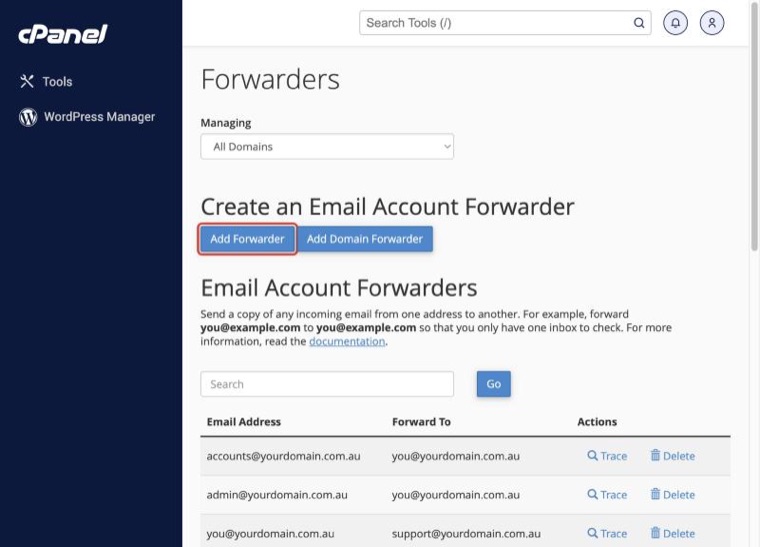
Creating a Forwarder
- Click Add Forwarder
- Under Address to Forward, enter the part before the @ and choose the domain
- Under Destination, choose Forward to Email Address and enter where the email should go
- Click Add Forwarder
The address you forward from doesn't need to be a real email account. For example, you can forward sales@yourdomain.com.au straight to your personal inbox.
Forwarding to More Than One Address
Create one forwarder for each destination. For example, to send sales@ to both Jane and Sam, make two forwarders from sales@: one to Jane's address and one to Sam's.
Forwarding and Keeping a Copy
If the address you forward from is also a real email account, it keeps its own copy of each email as well as sending one on. So to keep a copy, create the email account first, then add the forwarder.
Other Destination Options
- Discard and send an error to the sender: rejects the email with a message you choose. Useful for an address you no longer use
- Pipe to a Program: for developers who need email passed to a script
Changing or Removing a Forwarder
- Go to Forwarders in cPanel
- Find the forwarder in the list
- Click Delete to remove it. To change where it goes, delete it and create a new one
Forwarding a Whole Domain
You can forward every email sent to one domain to the same address on another domain:
- In Forwarders, click Add Domain Forwarder
- Choose the domain to forward from
- Enter the domain to forward to
- Click Add Domain Forwarder
To catch email sent to addresses that don't exist, see How to Set a Default (Catch-All) Address.
Forwarding Not Working?
- Check the forwarder is in the list
- Check the destination address for typos
- Look in the destination inbox's spam folder
- Use Track Delivery in cPanel to see what happened to a message
Need help? Contact our support team.
