
You can add or change the card we use for automatic payments at any time in the Client Area.
Adding a New Card
- Log in to https://secure.aisweb.com.au
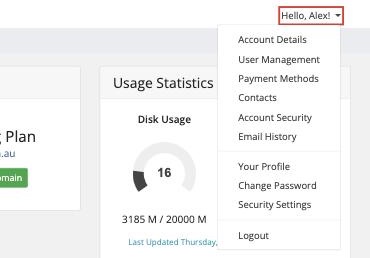
- Click Hello, [your name]! at the top right, then Payment Methods
- Click Add New Card
- Enter your card details and click Save Changes
Making It Your Default
- In Payment Methods, find the card you want to use
- Click Set as Default
Your default card is used for automatic renewals.
Removing an Old Card
- In Payment Methods, find the old card
- Click Delete
Add your new card before deleting the old one, so a renewal isn't missed in between.
Ways to Pay
- Credit or debit card
- Bank transfer (our bank details are shown on your invoice)
Security
Card payments are handled by our payment provider, which meets the PCI DSS security standard. Your full card number is never stored on our servers.
Need Help?
If you have trouble updating your card, contact our accounts team.
