
If you need more space or features, you can move to a bigger plan at any time. Your website, email and files stay exactly where they are.
Changing Your Plan
- Log in to https://secure.aisweb.com.au
- Click Services, then My Services
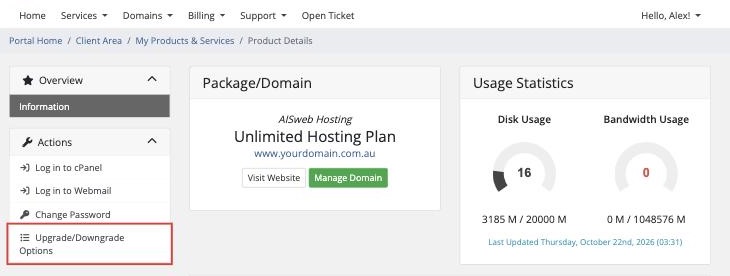
- Click your hosting service
- Click Upgrade/Downgrade Options
- Choose your new plan and billing cycle, then click Choose Product
- Check the price and click Continue, then complete the order
How the Price Works
You only pay the difference for the rest of your current billing period. The new plan's full price applies from your next renewal.
When Does It Take Effect?
As soon as the upgrade invoice is paid, your account is moved to the new plan automatically. There's no downtime.
Downgrading
You can move to a smaller plan the same way. Before you do, make sure your disk usage and number of email accounts fit within the smaller plan's limits.
Not Sure Which Plan You Need?
Contact our sales team and we'll recommend the right plan.
