
A support ticket is the best way to get help from our team. It keeps a record of everything, so nothing gets lost.
Opening a Ticket
- Log in to https://secure.aisweb.com.au
- Click Open Ticket in the top menu
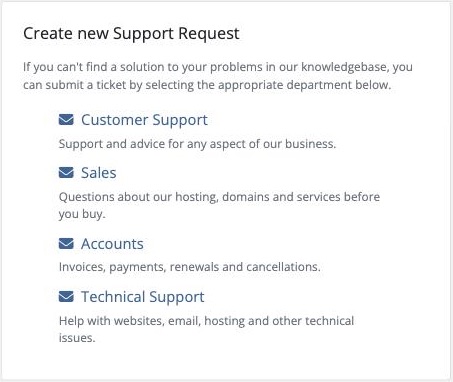
- Choose the right department:
- Customer Support: general questions, or if you're not sure
- Technical Support: websites, email, cPanel and anything not working
- Sales: plans, pricing and new services
- Accounts: invoices, payments, refunds and cancellations
- Enter a clear subject, like "Can't send email from Outlook"
- If it's about a particular service, choose it from Related Service
- Describe the problem and click Submit
You'll get an email confirming your ticket number straight away.
You Can Also Email Us
Emails to support@aisweb.com.au open a ticket automatically. Send from the email address on your account so we know it's you.
Help Us Help You Faster
Include as much of this as you can:
- The website address or email address that's affected
- What you were trying to do, and what happened instead
- The exact error message, or a screenshot
- When it started, and anything that changed around then
- What you've already tried
Never send passwords in a ticket. We can access your services without them.
Following Up
Reply to the ticket email, or log in and go to Support > Tickets. Replying keeps everything in one place, so please don't open a new ticket for the same problem.
