
You can give other people, such as a business partner, bookkeeper or web developer, their own login to your Client Area. You choose what they can see and do, and they never need your password.
Inviting a User
- Log in to https://secure.aisweb.com.au
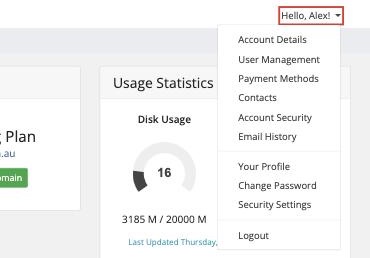
- Click Hello, [your name]! at the top right, then User Management
- Enter their email address
- Choose All Permissions, or Choose Permissions to pick what they can access, for example:
- Your bookkeeper: Invoices and Quotes only
- Your developer: Services, Domains and Support Tickets
- Click Send Invite
They'll get an email with a link to set up their own login.
Changing or Removing Access
Go back to User Management. Click Manage Permissions next to a user to change what they can do, or Remove Access to remove them completely.
Users vs Contacts
- Users can log in to your account
- Contacts can't log in, but can receive emails such as invoices or domain notices. See How to Update Your Account Details
