
This guide shows you how to add your AISweb email account to Outlook on Windows or Mac.
What You'll Need
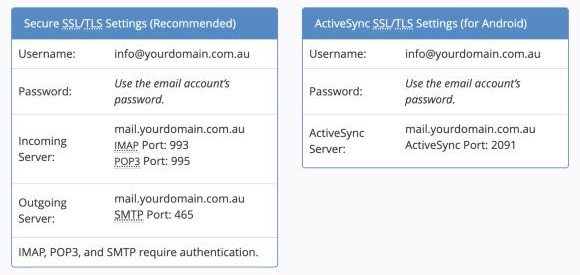
- Email address: your full email address
- Password: your email password
- Incoming server (IMAP):
mail.yourdomain.com.au, port 993, SSL/TLS - Outgoing server (SMTP):
mail.yourdomain.com.au, port 465, SSL/TLS
Replace yourdomain.com.au with your own domain.
New Outlook for Windows and Outlook for Mac
- Open Outlook
- Go to Settings (the gear icon) > Accounts > Email accounts, then click Add account. On a Mac, go to Outlook > Settings > Accounts and click +
- Enter your email address and click Continue
- If Outlook can't set it up automatically, choose IMAP
- Enter your password
- Click Show more or Advanced settings and enter:
- IMAP incoming server: mail.yourdomain.com.au, port 993, SSL/TLS
- SMTP outgoing server: mail.yourdomain.com.au, port 465, SSL/TLS
- SMTP username and password: the same as your email address and password
- Click Continue or Add account
Classic Outlook for Windows (Outlook 2016, 2019, 2021 and Microsoft 365)
- Open Outlook and click File > Add Account
- Enter your email address, click Advanced options, tick Let me set up my account manually, and click Connect
- Choose IMAP
- Enter the settings:
- Incoming mail: server mail.yourdomain.com.au, port 993, encryption SSL/TLS
- Outgoing mail: server mail.yourdomain.com.au, port 465, encryption SSL/TLS
- Click Next, enter your password, and click Connect
- Click Done
Troubleshooting
- Keeps asking for your password: check it by logging in to webmail. If it's wrong, reset it in cPanel, then enter the new one in Outlook
- Can't send email: check the outgoing server is set to port 465 with SSL/TLS, and that authentication uses your full email address. If 465 is blocked, try port 587 with STARTTLS
- Certificate warning: make sure the server name is mail. followed by your own domain. If the warning keeps coming up, contact us
- Folders don't match webmail: in Outlook, right-click the account and choose Update Folder List, or check you chose IMAP rather than POP
Need help? Our support team is here 24/7.
