
Thunderbird is a free email app for Windows, Mac and Linux. Here's how to add your AISweb email account.
Adding Your Account
- Open Thunderbird
- Click the menu (three lines), then Account Settings > Account Actions > Add Mail Account
- Enter your name, full email address and password
- Click Continue
- Thunderbird will try to find your settings. Make sure IMAP is selected
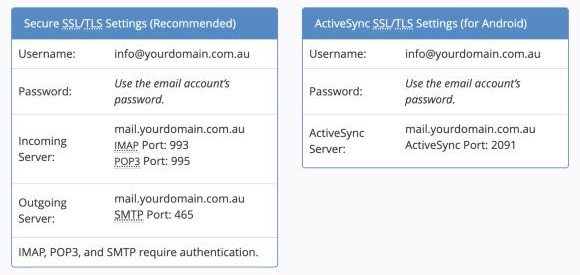
- If the settings don't look right, click Configure manually and enter:
- Incoming: IMAP, server
mail.yourdomain.com.au, port 993, SSL/TLS, normal password - Outgoing: SMTP, server
mail.yourdomain.com.au, port 465, SSL/TLS, normal password - Username: your full email address, for both
- Incoming: IMAP, server
- Click Done
Replace yourdomain.com.au with your own domain.
Troubleshooting
- Check your password by logging in to webmail
- If sending fails, try port 587 with STARTTLS
- See Can't Send Email? Common Fixes
