
If you can receive email but can't send it, the problem is almost always a setting in your email app. Work through these in order.
1. Check Your Outgoing Server Settings
Your outgoing (SMTP) settings should be:
- Server:
mail.yourdomain.com.au - Port: 465 with SSL/TLS, or 587 with STARTTLS
- Authentication: turned on, using your full email address and email password
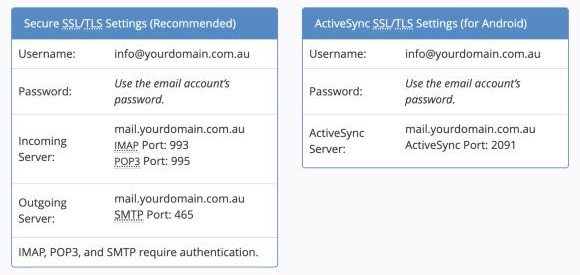
The most common mistake is outgoing authentication being turned off. In most apps it's a tick box like My outgoing server requires authentication or Use the same settings as incoming.
2. Try Sending From Webmail
Log in to webmail and send a test email.
- Works in webmail: the problem is your email app's settings. Recheck step 1
- Doesn't work in webmail either: look at the error message and carry on below
3. Read the Error Message
- Authentication failed or incorrect password: reset the email password and update it in your app
- Relaying denied or relay not permitted: outgoing authentication is off. Turn it on
- Connection timed out: your internet provider or network may block that port. Try the other port (465 or 587)
- Mailbox full: your own mailbox is full. See Understanding Email Quotas
- Rejected by the recipient: see Track Delivery for the reason
4. Sending Limits
To protect our servers from spam, there's a limit on how many emails an account can send per hour. If you send newsletters or bulk email, use a service like Mailchimp instead.
Still Stuck?
Open a ticket with Technical Support and include the exact error message, the email app you're using, and a screenshot of your outgoing settings (with the password hidden).
