
Depending on your plan, you can host more than one website in a single cPanel account. Each extra domain or subdomain gets its own folder.
Adding Another Domain
- Make sure the domain is pointing to AISweb (see How to Change Your Nameservers)
- Log in to cPanel (see How to Log In to cPanel)
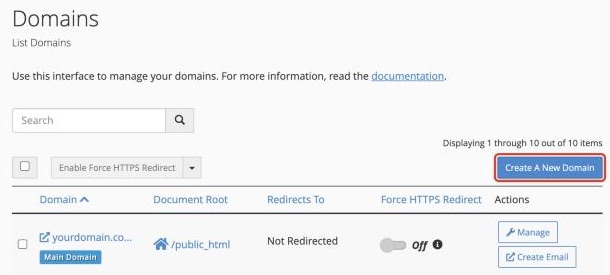
- In the Domains section, click Domains
- Click Create A New Domain
- Enter the domain name, for example
secondsite.com.au - Untick Share document root so the new site gets its own folder
- Check the folder name in Document Root, then click Submit
Upload the new site's files to that folder.
Adding a Subdomain
A subdomain is an extra address under your main domain, such as shop.yourdomain.com.au or staging.yourdomain.com.au.
- In Domains, click Create A New Domain
- Enter the full subdomain, for example
shop.yourdomain.com.au - Untick Share document root and check the folder name
- Click Submit
SSL for New Domains
Your free SSL certificate is added to new domains and subdomains automatically, usually within a few hours. See Free SSL Certificates and HTTPS.
Can't Add a Domain?
If cPanel says you've reached your limit, your plan may not include more domains. See How to Upgrade Your Hosting Plan, or contact our sales team.
